Annotation handler
Implementation: src/app/ui/handlers/annotation_handler.py
AnnotationHandler is where a person corrects what the detector and tracker
found. Dragging a box, pressing Delete, relabelling or copying a box to the
next frame all start here. It is the largest handler (about 1,100 lines)
because every editing gesture (canvas, buttons, menu, keyboard) funnels
through it.
The handler decides nothing about layer rules. It works out what the user meant (which boxes, which tab), snapshots state for undo, calls the Application facade, then asks the UI to redraw.
Where this sits


Arrows are calls on the GUI thread. No worker is involved: edits are in-memory changes to the session's layer data. The whole stack is in the big picture; sibling handlers are listed in the handlers overview.
What it listens to
Arrows show who calls whom. The handler keeps almost no state of its own:
selection and undo history live on the Window
(view state); only the keyboard-nudge counter is local.
| Input | Connected to | Meaning |
|---|---|---|
bbox_drawn |
on_preview_bbox_drawn |
New rectangle drawn in Add mode |
bbox_edited |
on_preview_bbox_edited |
One box moved or resized on canvas |
bboxes_moved |
on_preview_bboxes_moved |
Group drag of the selection |
bbox_deleted |
on_preview_bbox_deleted |
Click in Delete mode |
bbox_selected, bbox_selection_requested, bbox_selection_cleared, bbox_marquee_selected |
selection slots | Canvas selection gestures |
context_action_triggered |
on_preview_context_action |
Right-click menu |
| Bottom-panel buttons | edit, relabel, delete, delete next/prev occurrences, copy to prev/next, four reset buttons | Table-side actions |
| Key events | FrameTableKeyFilter calls handle_selection_shortcut, handle_delete_key, handle_nudge_key |
Ctrl shortcuts, Delete, arrows |
Which layer does an edit touch?
Solid arrows into B/D are writes or first-read seeding; dashed arrows are the Reset buttons.
The active tab decides the layer: Detection edits layer B, Tracking edits layer D. A and C are never written by this handler; the services reject reset and edit requests for them.
- Seeding is lazy. Reading a frame for a tab
(
get_tab_frame_boxes_for_session_id) copies that frame's filtered A (or C) boxes into B (or D) only if the editable frame does not exist yet. A frame you intentionally emptied stays empty. - Reset replaces the editable frame (or every frame) with filtered clones of A or C. Reset-all on B also re-applies the confidence and size settings.
- Copy to adjacent frame, paste, duplicate create new boxes with fresh
manual-Nids andMANUALsource in the active tab's layer. - Editing B does not change C or D. Tracking consumes A or B only when you run it, so edited detections affect tracks only after tracking is re-run.
Current behaviour: drawing always writes layer B
A box drawn on the canvas goes through
add_manual_detection_box_at_current_frame_index, which writes layer B
even when the Tracking tab is active. Paste and duplicate, by contrast,
follow the active tab.
Why this matters downstream
Blurred export prefers populated layer D and otherwise falls back to C, so a Tracking-tab edit changes the video; a Detection-tab edit does not until tracking is run again.
Selection
Selection is one list of box keys in BBoxSelectionState that the canvas and
the table both read. _apply_selection_keys(keys, record_history=...) is the
single funnel: it stores the list, refreshes the bottom-panel button states,
tells the overlay which boxes to highlight and (when asked) pushes an entry
on the selection undo stack. Table-row selection writes the shared state
directly from the bottom panel, which is why it is dashed.
- Click selects one; Ctrl+click toggles; a marquee adds to the selection; clicking empty canvas clears it.
Ctrl+A/Ctrl+D/Ctrl+Iselect all / none / inverse of the active tab's frame boxes.- Keys are strings such as
track:track-uidormanual:manual-3, unique per frame and layer.
Edit operations
| Operation | Entry point | Layer call | Undo recorded |
|---|---|---|---|
| Draw box (label dialog) | handle_new_drawn_box |
add to B | yes |
| Move or resize on canvas | handle_existing_box_edit(new_coords) |
update box in B or D | yes |
| Edit dialog (exactly one selected) | on_edit_selected |
update box | yes |
| Relabel (all selected) | on_relabel_selected |
update each box | yes |
| Nudge (arrows) / group drag | handle_nudge_key, on_preview_bboxes_moved |
move by delta | yes |
| Delete selected / Delete key / Ctrl+X | on_delete_selected |
delete keys on tab's layer | yes |
Copy / paste (Ctrl+C, Ctrl+V) |
clipboard in window state | add manual boxes | paste only |
| Duplicate on this frame | context menu | add manual boxes | yes |
| Copy to previous / next frame | copy_to_direction |
clone into adjacent frame | yes |
| Delete next / previous occurrences | _delete_occurrences |
delete track by id, direction | no |
| Reset frame / reset all | on_reset_* |
overwrite from A or C | no |
Keyboard nudging accelerates while a key repeats: 1 pixel for the first four presses, then 2, 4 and finally 8. A different key or a pause over 0.35 s restarts the count.
Current behaviour: tracking-only and unrecorded operations
"Delete occurrences" works only on the Tracking tab (other tabs get an "Operation Invalid" dialog) and, like the reset actions, is not recorded in undo history. After a reset, Ctrl+Z restores the last recorded edit from before the reset.
Clipboard is not tab-aware when pasting
The clipboard remembers the tab it came from, but paste writes into whichever tab is active at paste time.
Worked example: delete and undo
Time runs downward. Suppose the Tracking tab shows two boxes and you select one and press Delete.
- The key filter offers the event to
handle_selection_shortcut, thenhandle_delete_key, which callson_delete_selected. - The handler clones the active tab's current boxes (the before state) and remembers the selection.
delete_boxes_by_keys_and_tab_id_for_current_frame_by_session_iddeletes the key from layer D at the current frame. Layer C is untouched.- The selection is cleared and a mutation entry (before and after boxes, before and after selection) is pushed.
render_frame_for_session_idredraws: overlay, data table and button states all show one box.- Ctrl+Z pops that entry;
replace_tab_frame_boxesoverwrites the frame in layer D with the stored clones, the selection returns and the frame re-renders.
Any exception in steps 2-5 becomes a "Delete Failed" error dialog; the handler catches it so the event loop continues.
The same flow for a drag
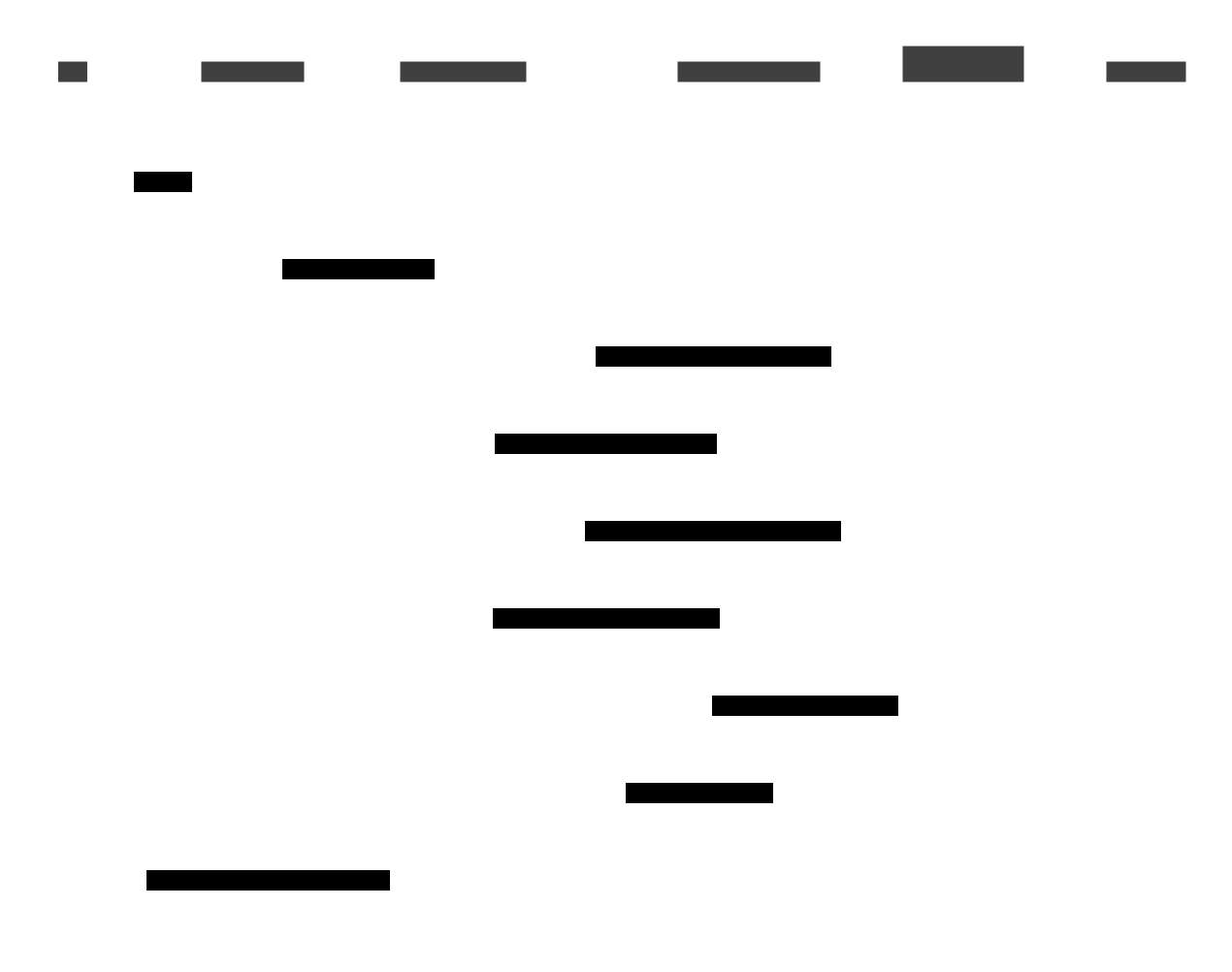
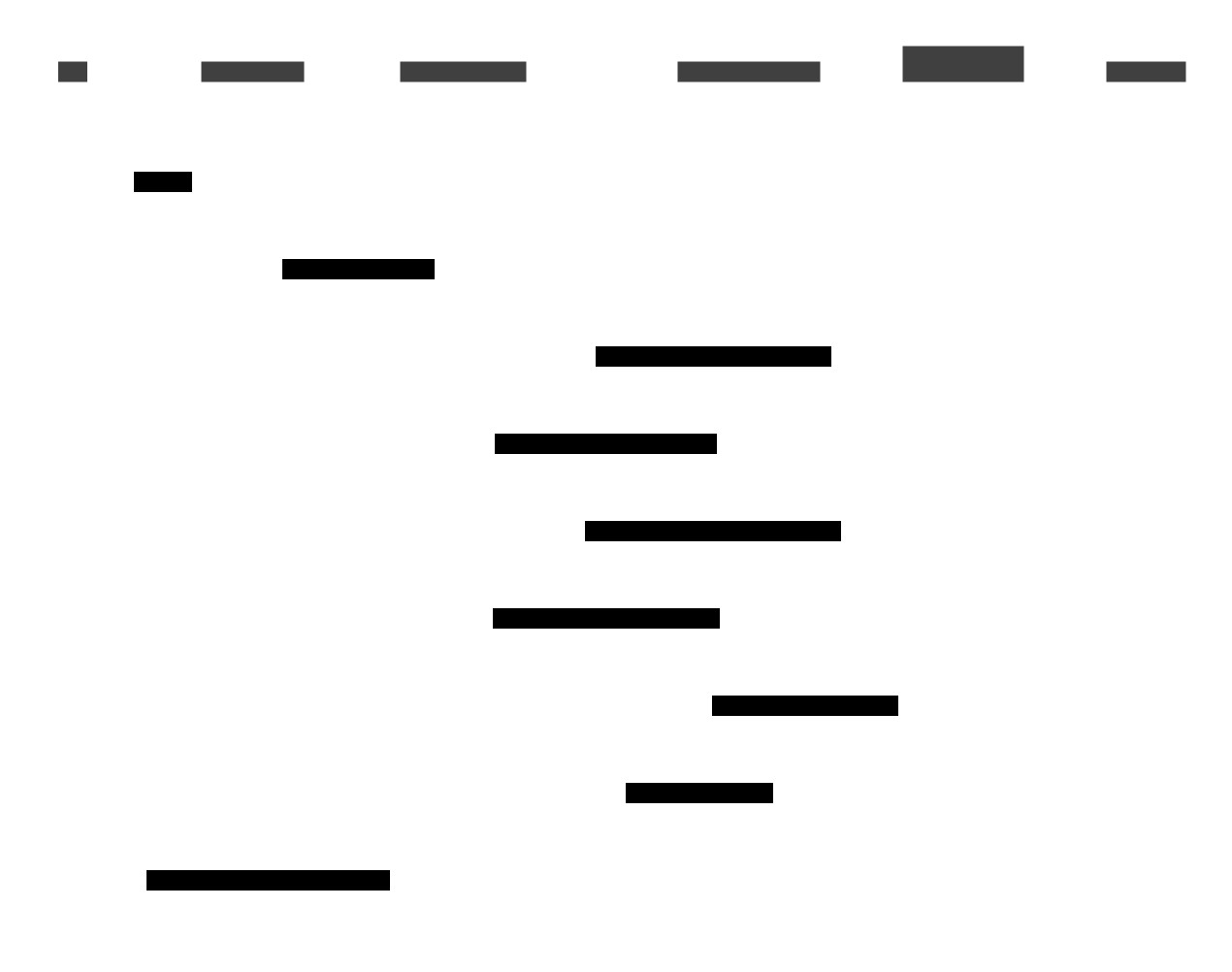
The first lookup picks the layer from the active tab (D for Tracking, B otherwise). If the box key is not found, the handler returns silently.
Undo and redo
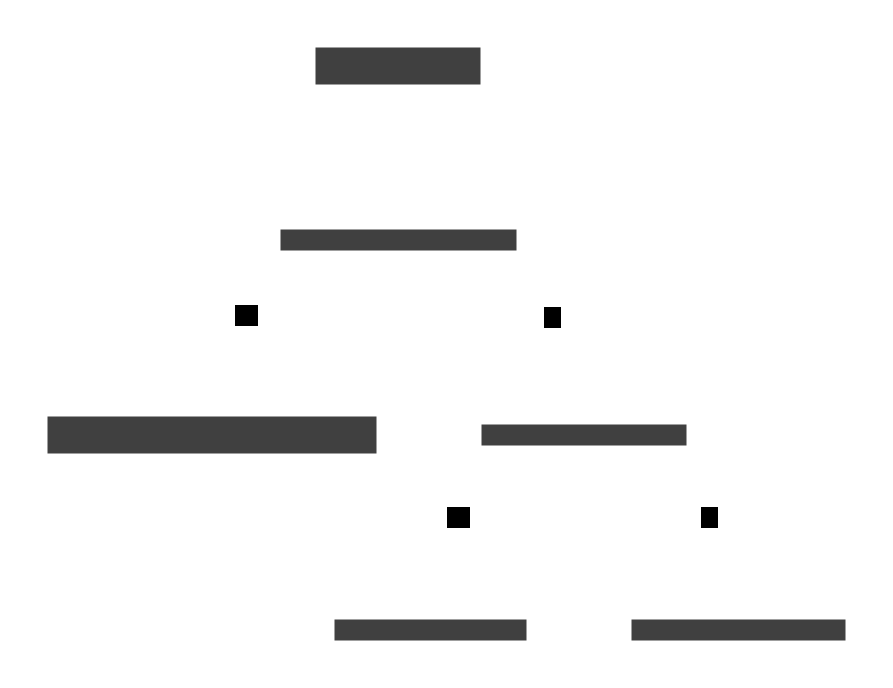
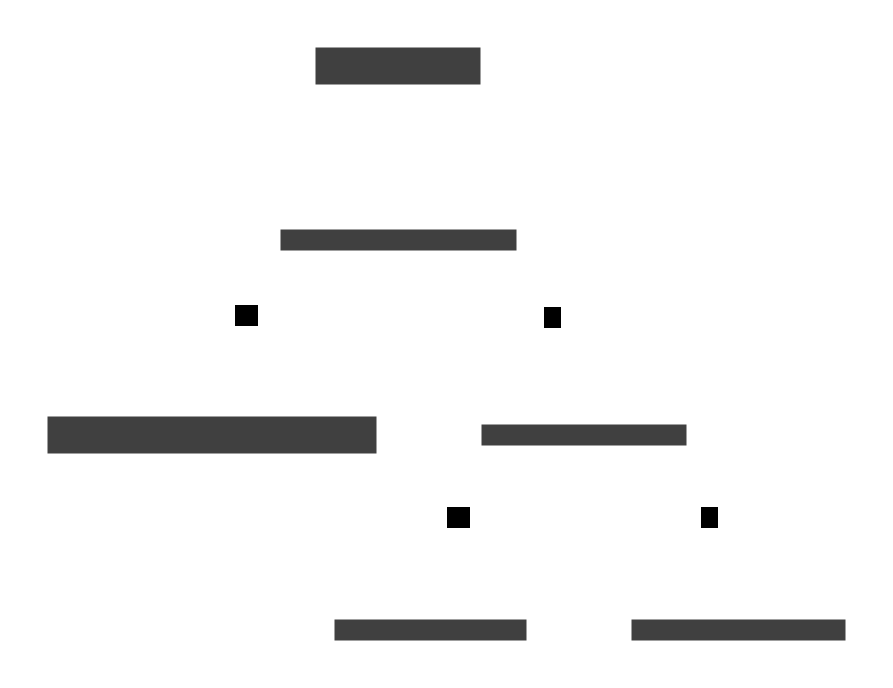
SelectionHistoryState keeps four stacks per (session, tab): selection
undo/redo and mutation undo/redo. A new edit clears the matching redo stack.
Ctrl+Y mirrors the diagram.
Snapshots, not commands
A mutation stores full copies of the frame's boxes before and after, so undo is an overwrite of that frame rather than an inverse operation. The entry remembers its own frame index; the restore redraws the current frame, so undoing an edit made on another frame changes that frame's data without showing it. Nothing in the handler bounds the stack size.
Refresh flow
There are no change notifications from the layer store. Every mutating slot
ends with an explicit controller.render_frame_for_session_id(s_id), which
re-reads the active tab's boxes and repaints preview, table and slider (see
the render pipeline). A new code
path that edits layers must therefore call it too.
Error handling
Slots wrap facade calls in try/except Exception and show
window.show_error("<Operation> Failed", message). Only
_delete_occurrences also logs the exception; other branches rely on the
dialog alone.
Dead code
_on_bbox_drawn (a one-shot variant that takes a label) is not connected
anywhere; the live path is on_preview_bbox_drawn ->
handle_new_drawn_box.
See the API reference for exact signatures, and Annotation layers for the A-D model.