Detection engine
Source: src/app/infrastructure/detection/engine
An image is a grid of pixels. A detection model guesses which objects appear in
that grid and where they are. DetectionEngine gives the rest of Blurzy one
way to ask that question: supply one image and receive a list of detected
objects.
The engine is a small coordinator, not the neural network. It loads one selected model wrapper and delegates work to it. The wrapper knows how to talk to its provider library and translate predictions into Blurzy's common result format.
One image in, common results out
Solid arrows show the image/prediction/result flow. The dashed arrow shows a choice made when loading: YOLO, TorchVision, MTCNN, and Dummy are alternatives, not a sequence of models run on every image.
| Part | In plain language |
|---|---|
DetectionEngine |
Keeps the chosen model and forwards each image to it |
load_detection_model() |
Looks up a registered model name and creates its wrapper |
BaseDetectionModel |
The shared contract: a wrapper accepts an image and returns detections |
| Provider wrapper | Handles library-specific loading and inference |
| Provider library | Runs the trained neural network and produces raw predictions |
| Mapper | Filters and translates provider output into common detection records |
For example, YOLO produces its own boxes, class numbers, and confidence values.
YoloDetectionMapper turns class numbers into labels, converts coordinates to
integer pixels, and creates DetectionResult records. The engine itself does
not perform that conversion: it returns the wrapper's list directly.
That stable boundary keeps provider-specific result objects out of callers. Switching providers does not require each caller to learn a new output format, but it does not make providers equivalent: a face detector and a general object detector do not find the same things. See Detection models for that integration boundary and the generated API reference for exact provider contracts.
Load once, then process images
Solid arrows show the successful call order; dashed arrows show error paths. The inference settings and caught-error branches in this diagram describe YOLO specifically, not every provider.
- Construct:
DetectionEngine("YOLOv8n")asks the loader for the wrapper. The wrapper loads the model weights (the trained parameters) during construction. - Call:
engine.detect(frame)forwards the pixel array toself._model.detect(frame, None).Nonemeans the engine requests no label restriction. - Predict and translate: the wrapper calls the provider and maps its
output. YOLO uses a confidence threshold of
0.25and an NMS IoU threshold of0.45. NMS suppresses competing overlapping predictions; IoU measures the overlap between their boxes. - Return: the caller receives
list[DetectionResult], which can be empty. The loaded wrapper is reused for the next image.
import numpy as np
from PIL import Image
from app.infrastructure.detection.engine.detection_engine import DetectionEngine

with Image.open("docs/assets/api/detection_engine/snapshot-original.png") as image:
    frame = np.array(image.convert("RGB"))

engine = DetectionEngine("YOLOv8n")
detections = engine.detect(frame)
This mirrors the application's RGB image path, including the current YOLO channel-order limitation described below. It is not a recommendation to treat RGB and BGR as interchangeable.
A real image through the engine
Here is the supplied street-scene snapshot, before any annotations:
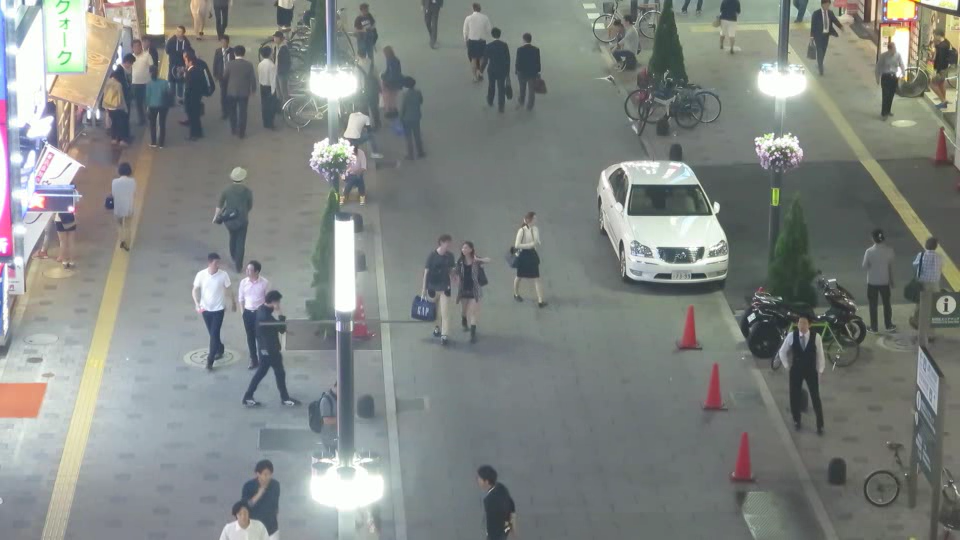
The example generator called DetectionEngine("YOLOv8n").detect(frame), not
Ultralytics directly. On this image it returned 27 records:
| Label | Returned detections |
|---|---|
person |
24 |
motorcycle |
2 |
car |
1 |
The same returned records were used to draw these boxes:
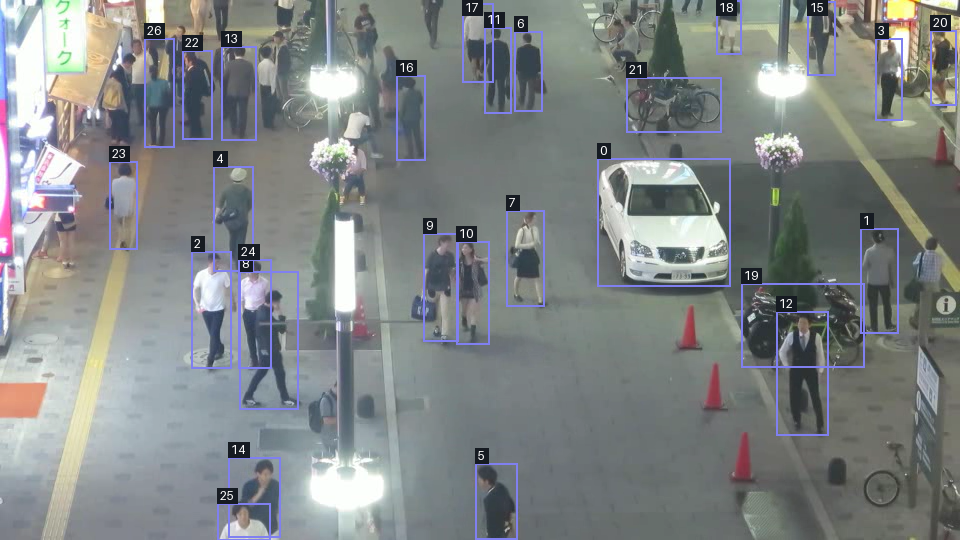
The numeric tags are short record IDs: 0 means yolo-0, for example.
Short tags avoid covering this crowded scene with long labels. All classes are
retained, and the downloadable data contains the label and score for every box.
Some tags overlap and some objects are missed; this is model output, not a
ground-truth annotation or a promise that every visible person was detected.
Reading one result
These are actual records from this run, with scores rounded only for display:
| Record | Label | Confidence | Box (x1, y1, x2, y2) |
|---|---|---|---|
yolo-0 |
car |
0.888 | (597, 158, 730, 286) |
yolo-1 |
person |
0.842 | (860, 228, 898, 333) |
yolo-2 |
person |
0.812 | (191, 251, 231, 368) |
The image origin is its top-left corner: x increases rightward and y increases
downward. A box gives its top-left and bottom-right pixel coordinates in the
original 960 x 540 image. Confidence is the model's score, not a guarantee
that a prediction is correct. The mapper's yolo-N IDs are local to its output;
they are not tracking IDs and do not identify the same person across frames.
color_hex is presentation metadata, not another model prediction. See
Bounding box and
Detection domain values.
Download all results and run metadata (JSON). The file includes full-precision scores, coordinates, counts, image and weights hashes, package versions, and input/settings details.
Reproduce the example
From the repository root, with the application dependencies installed and the
existing yolov8n.pt weights available locally, run:
python scripts\generate_detection_engine_example.py
The default input is the published original PNG. To regenerate from the supplied root-level file instead:
python scripts\generate_detection_engine_example.py --input MOT17-04-SDP-snapshot.png
Generation is opt-in, not part of the documentation build. The script refuses
missing local weights, warnings, empty results for this example, and invalid
boxes, rather than publishing a success-shaped failure. It writes both PNGs
and the JSON to docs/assets/api/detection_engine/.
The recorded run used Python 3.14.3, Ultralytics 8.4.177, Torch 2.14.1,
confidence 0.25, IoU 0.45, no class restriction, and otherwise installed
provider defaults. Different weights, versions, hardware, or provider defaults
can change results. The JSON's packages field reports installed distribution
metadata, which can differ from the source checkout's project version.
Current input-channel limitation
Blurzy's video reader produces RGB arrays, and the YOLO wrapper forwards arrays unchanged. The installed Ultralytics predictor expects BGR NumPy input and reverses the channels internally. This example deliberately passes RGB to match the current application path, so the provider sees swapped red/blue channels. These results demonstrate existing behavior, not a corrected color pipeline or an accuracy benchmark. Other wrappers have different preprocessing; the common interface alone does not solve this.
Image provenance
The input was supplied as MOT17-04-SDP-snapshot.png. Its exact origin and
redistribution permission have not been verified. The filename is not a
license grant; resolve attribution and permission before public distribution.
What prevents a failure from breaking the workflow?
The shared interface avoids incompatible result shapes in callers, but it is not a universal error boundary. Current behavior depends on where a failure occurs:
| Situation | Current behavior |
|---|---|
| Unknown registered name | Loader raises DetectionModelError |
| YOLO dependency or weights cannot load | YOLO loader raises DetectionModelError |
| YOLO inference raises an exception | Wrapper logs a warning and returns [] |
| One YOLO prediction cannot be mapped | Mapper logs a warning and skips that item |
| Other exception reaches the engine | Engine does not catch it |
Consequently, [] alone cannot tell a caller whether no objects were found or
YOLO inference failed; logs matter. The detection worker has its own
outer error reporting for exceptions that reach its video loop. Do not infer
that every provider has YOLO's recovery behavior.
set_model() also deserves care: it updates the stored name before loading
the replacement. If loading fails, the previous wrapper remains but the name
has already changed. Switching is not an atomic rollback operation; callers
must handle the exception rather than assume a successful switch.
Where the engine stops
The engine handles one image per call. It does not iterate a video, assign
persistent tracking identities, draw boxes, or blur pixels. The annotated image
above is drawn by the example generator, not by DetectionEngine.
The application factory wraps the engine in an adapter exposing the application interface. The Application manager owns engines per session and coordinates model selection; the worker reads frames and emits batches. See Application managers and Detection worker for those responsibilities.
Supported names remain in
src/app/infrastructure/detection/model/names.py; the generated engine API
catalog reads those registries. This guide does not maintain a duplicate list.
Maintain these illustrations
Editable sources and rendered images live together in
docs/assets/api/detection_engine/. With the D2 CLI on PATH, regenerate both
diagrams from the repository root:
foreach ($name in @('flow', 'lifecycle')) {
    d2 --theme 0 --pad 24 "docs\assets\api\detection_engine\$name.d2" "docs\assets\api\detection_engine\$name-light.svg"
    d2 --theme 200 --pad 24 "docs\assets\api\detection_engine\$name.d2" "docs\assets\api\detection_engine\$name-dark.svg"
}
Follow Writing architecture guides for the shared authoring, asset, and evidence conventions.