Introduction to Bitwise algorithms
Bitwise operators work directly on binary bits ($0$ and $1$).
Since computers store all data in binary form, bitwise operations help in manipulating data at the lowest level.
| Operator | Example | Python Examples |
|---|---|---|
| AND Conjunction |
$A \land B$ or $A \cdot B$ |
A & B (bitwise)A and B(logical) |
| OR Disjunction |
$A \lor B$ or $A + B$ |
A | B (bitwise)A or B (logical) |
| NOT Negation |
$\neg A$ or $\overline{A}$ or $A’$ |
~ A (bitwise)not A (logical) |
| NAND Inverted AND |
$\overline{A \land B}$ or $\overline{A \cdot B}$ |
~ (A & B) (bitwise)not (A and B) (logical) |
| NOR Inverted OR |
$\overline{A \lor B}$ or $\overline{A + B}$ |
~ (A | B) (bitwise)not (A or B) (logical) |
| XOR Exclusive OR |
$A \oplus B$ | A ^ B (bitwise)A != B (logical inequality) |
| XNOR Exclusive NOR |
$A \odot B$ or $\overline{A \oplus B}$ |
~ (A ^ B) (bitwise)A == B (logical equality) |
Uses
🚀 Used in:
- optimization
- performance-critical code
- masking
- toggling bits, and
- low-level programming.
⚡ Used to perform fast calculations and binary manipulation.
🚦 Help in setting, clearing, checking, and toggling bits.
Bitwise operations’ features
🏃 Often faster for low-level and bit-manipulation tasks.
🎏 Enable packing multiple flags into a single variable, reducing memory usage.
Bitwise Operators / Basics of Bit manipulation
Bit manipulation works on binary bits ($0$ and $1$), making it fast and efficient. These operations are executed by the CPU’s Arithmetic Logic Unit (ALU) and are commonly used for optimization, efficient flag handling, and performance-critical tasks.
Main Bitwise Operators:
- AND
& - OR
| - XOR
^ - NOT
~ - Left Shift
<< - Right Shift
>>
Truth Table
X |
Y |
ANDX & Y |
ORX | Y |
XORX ^ Y |
NOT~ X |
|---|---|---|---|---|---|
| $0$ | $0$ | $0$ | $0$ | $0$ | $1$ |
| $0$ | $1$ | $0$ | $1$ | $1$ | $1$ |
| $1$ | $0$ | $0$ | $1$ | $1$ | $0$ |
| $1$ | $1$ | $1$ | $1$ | $0$ | $0$ |
Bitwise AND & Operator
The & operator takes two equal-length bit patterns as parameters.
The two-bit integers are compared.
If the bits in the compared positions of the bit patterns are $1$, then the resulting bit is $1$. If not, it is $0$.
Truth Table
X |
Y |
ANDX & Y |
|---|---|---|
| $0$ | $0$ | $0$ |
| $0$ | $1$ | $0$ |
| $1$ | $0$ | $0$ |
| $1$ | $1$ | $1$ |
Example:
Let $X$ = $7$ = $(111)_2$ and $Y$ = 4 = $(100)_2$ .
Then Bitwise AND & of both, i.e. $X$ & Y will be $4$.
Bitwise OR | Operator
The | Operator takes two equivalent length bit designs as boundaries; if the two bits in the looked-at position are $0$, the next bit is zero. If not, it is $1$.
Input A |
Input B |
Output A & B |
Description |
|---|---|---|---|
| $0$ | $0$ | $0$ | Both bits are $0$ |
| $0$ | $1$ | $1$ | One bit is $1$ |
| $1$ | $0$ | $1$ | One bit is $1$ |
| $1$ | $1$ | $1$ | Both bits are $1$ |
Example:
Let $X$ and $Y$ be two bit values , where $X$ = 7= $(111)_2$ and $Y$ = 4 = $(100)_2$ .
Bitwise OR | of $X$, $Y$:
Bitwise XOR ^ Operator
XOR ^ $\implies$ Exclusive OR.
Here, if bits in the compared position do NOT match their resulting bit is $1$ (Bitwise XOR ^ of two bit operands is $1$ if the bits are opposite, otherwise $0$.
Truth Table
X |
Y |
XORX ^ Y |
|---|---|---|
| $0$ | $0$ | $0$ |
| $0$ | $1$ | $1$ |
| $1$ | $0$ | $1$ |
| $1$ | $1$ | $0$ |
Example:
Take two bit values $X$ and Y, where $X$ = 7= $(111)_2$ and $Y$ = 4 = $(100)_2$ . Take Bitwise AND of both $X$ & $Y$
\[\begin{array}{r@{\;\;}c@{\,}c@{\,}l@{\quad}l} & 1 & 1 & 1_2 & \\ \land & 1 & 0 & 0_2 & \\ \hline & 0 & 1 & 1_2 & = 3 \end{array}\]Bitwise NOT ~ Operator
❗ Requires only one operand to operate, unlike other binary operators.
💎 Returns one’s complement of a single input.
X |
NOT~X |
|---|---|
| $0$ | $1$ |
| $1$ | $0$ |
Example
Let $X$ = 9 = $(1001)_2$ , where $X$ is a 4-bit value.
Take the Bitwise NOT ~ of X.
-missing-image-
Explanation
The bitwise NOT
~operator flips every bit in the number. $1$ becomes $0$, and vice-versa.
Note
The output of ~ depends on how many bits a system uses.
In a 4-bit system, ~ $1001_2$ ($9$) becomes $0110_2$ ($6$).
In an 8-bit system, $9$ is stored with leading zeros as $0000 1001_2$. Flipping it yields $1111 0110$, which is completely different ($246$).
Left Shift (<<)
The Left Shift operator is denoted by the double left arrow key («). The general syntax for Left Shift is shift-expression << k. The left-shift operator causes the bits in shift expression to be shifted to the left by the number of positions specified by k. The bit positions that the shift operation has vacated are zero-filled.
Note: Every time we shift a number towards the left by $1$ bit it multiply that number by $2$.
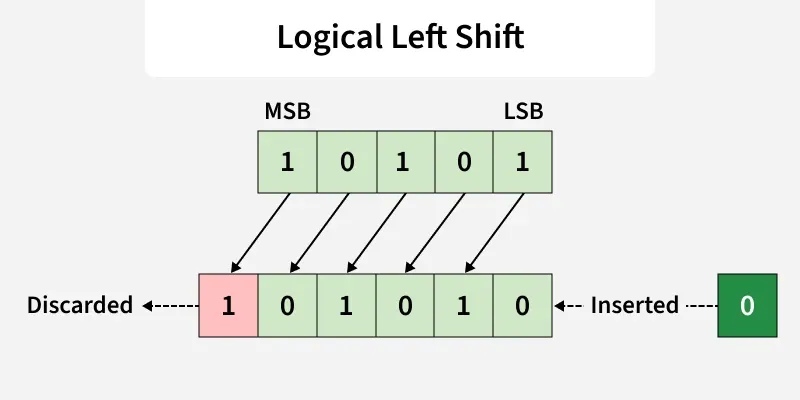 Image credits: GeeksforGeeks.org
Example:
Input: Left Shift of $5$ by $1$.
Binary representation of $5$ = $00101_2$ and
Left Shift of $00101_2 by $1$ (i.e, $00101$ << 1)
-missing-image-
Output
$10$
Explanation
Bits of 5 will be shifted by $1$ to left, resulting in $01010_2$ $\equiv$ $10$
Input: Left Shift of 5 by 2.
Binary representation of 5 = 00101 and Left Shift of 001012 by $1$ (i.e, 00101 << 2)
-missing-image-
Output
$20$
Explanation
Bits of 5 will be shifted by $1$ to left, resulting in $10100_2$ $\equiv$ $20$
Input: Left Shift of 5 by 3.
Binary representation of 5 = 00101 and Left Shift of 001012 by $1$ (i.e, 00101 << 3)
-missing-image-
Output
$40$
Explanation
All bit of 5 will be shifted by $1$ to left side and this result in $01000_2$ $\equiv$ $40$
Right Shift (>>)
The general syntax for the Right Shift is >> k
The >> operator causes the bits in shift expression to be shifted to the right by the number of positions specified by $k$.
For unsigned numbers, the bit positions that the shift operation has vacated are zero-filled.
For signed numbers, the sign bit is used to fill the vacated bit positions.
In other words, if the number is positive, $0$ is used, and if the number is negative, $1$ is used.
Note: Every time we shift a number towards the right by $1$ bit it divides that number by $2$.
logical_right_shift
Examples
Input
Right Shift of 5 by 1.
Binary representation of 5 = 00101 and Right Shift of 00101 by $1$ (i.e, 00101 >> 1)
-missing-image-
Right Shift of 5 by 1
Output
$2$
Explanation
All bit of $5$ will be shifted by $1$ to Right side and this result in $00010_2$, which is equivalent to $2$
Input: Right Shift of 5 by 2.
Right Shift of $5 = 00101_2$ by $2$ (i.e, $00101$ >> $2$)
-missing-image-
Output
$1$
Explanation
All bit of $5$ will be shifted by $2$ to Right side and this results in $00001_2$, Which is equivalent to $1$.
Input
Right Shift of 5 by 3.
Right Shift of $5 = 00101_2$ by $3$ (i.e, $00101$ >> $3$)
` -missing-image- `
Output
$0$
Explanation
All bit of 5 will be shifted by 3 to Right side and this result in 00000, Which is equivalent to 0
Application of Bit Operators
- Bit operations are used for the optimization of embedded systems.
- The Exclusive-or operator can be used to confirm the integrity of a file, making sure it has not been corrupted, especially after it has been in transit.
- Bitwise operations are used in Data encryption and compression.
- Bits are used in the area of networking, framing the packets of numerous bits which are sent to another system generally through any type of serial interface.
- Digital Image Processors use bitwise operations to enhance image pixels and to extract different sections of a microscopic image.